USB
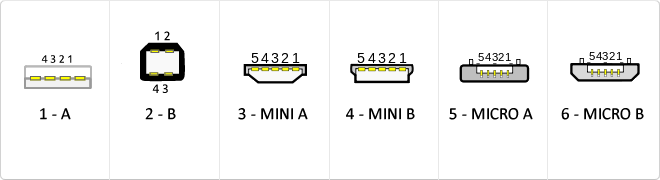
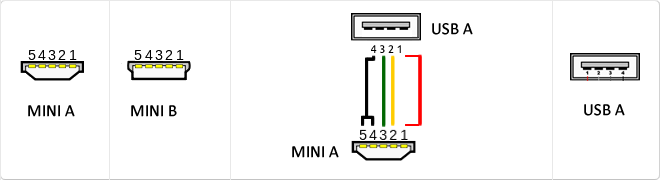
The USB (Universal Serial Bus) is a standard that defines the cables, connectors and used a bus to connect, communicate, computers, peripherals and electronic devices protocols Transmission Rates Low speed (USB 1.0). Transfer rate up to 1.5 Mbit/s (188 kB/s) used in keyboard, mouse ... transfer rate up to 12 Mbit/s (1.5 MB/s) High Speed ??(USB 2.0): Rate transferencia up to 480 Mbit/s (60 MB/s) SuperSpeed ??(USB 3.0) transfer rate up to 4.8 Gbit/s (600 MB/s) Connector Types 1 - USB type A (4 pin) 2. - USB type B (4 pin) 3 - Mini A (5-pin) 4 - Mini B (5-pin) 5 - Micro A (5-pin) 6 - Micro B (5-pin)
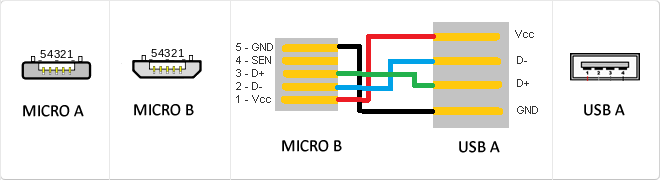
MicroUSB
or horizontal. The micro USB with five pins, which pins identification (ID) Micro AB USB connectors special work. AB connectors with pin ID can allow the device to function as a connector A or B to standard USB technology. This gives the new smart phones and other devices the option to act as either a single storage device or as provi
Mini USB
The mini USB connectors are smaller than their standard counterparts and have USB fifth pin. The fifth pin is known as the pin ID and is typically not used in mini USB connectors. It was designed to allow later improved USB technology. The mini USB connectors have a cycle life of at least 5000 connections and disconnections, which accommodates the mobile nature of the devices that are designed to interact. The standard USB connectors are generally used with devices that are stationary and not disconnected often.
USB 3.0
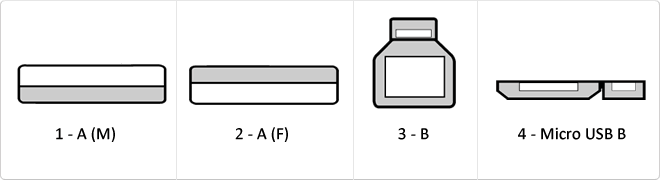
USB 3.0 is the second major revision of the standard Universal Serial Bus (USB) connectivity for computing. USB 3.0 has transmission speeds of up to 5 Gbit/s, which is 10 times faster than USB 2.0 (480 Mbit/s). Connector Types 1 - USB type A plug 2 - 3 USB type A female - USB type B 4 - Micro USB B
Parallel
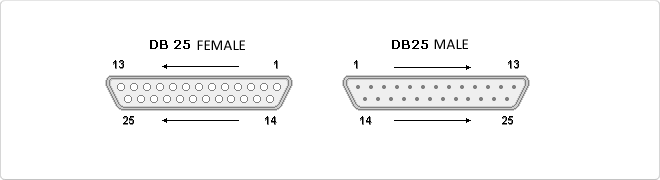
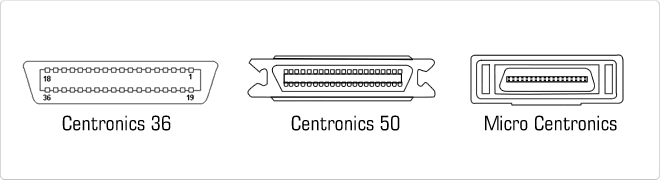
Parallel cable is the cable for computers defined by the IEEE 1284 standard for connecting peripherals via the parallel port. It is often used for connecting printers compatible PC computers. It is considered an outdated connection and has been replaced by USB. - IEEE 1284 Type A: 25-pin DB-25 IEEE 1284 - IEEE 1284 Type B: 36 Drivers, Champ type Centerline Connector 0.085 insurance (Centronics). - IEEE 1284 Type C: 36 conductors, connector type mini Champ de Centerline 0.050 with secure clip (mini Centronics).
Centronics
The Centronics 36-pin Centronics 36-pin connector is arranged in two rows of terminals, each with 18 contacts. It has fastening clamps. Centronics connector 36 is typically used for connecting printers normally. Also can be called IEEE 1284 Micro Centronics 36-pin Micro Centronics connector has two rows of pins, each row has 18 contacts. This connector has clampsclamping. It is very similar to Centronics 36-pin connector but half his size. Can also be called IEEE 1284 Type C connector, this connector is mainly used for multi-function devices. The Centronics 50-pin Centronics 50-pin connector has two rows of pins, each row has 25 contacts. This connector has clamps. The Centronics 50-pin connector is the utilizADO SCSI-1 (scanners, hard drives) devices. A variation Centronics connector 50 used in voice applications, this variant is called Telco connector.
IEEE 1284
The IEEE 1284 standard (Standard Signaling Method for a Bi-directional Parallel Peripheral Interface for Personal Computers, in Spanish, Standard Signaling Method for a Bi-directional Parallel Peripheral Interface for Personal Computers), approved for publication in March 1994, provides High speed communication and bidirectional between a computer and an external device that can reach 50 or 100 looksfaster than the original parallel port ces; as well as being fully compatible with peripherals, printers and software that previously existed.
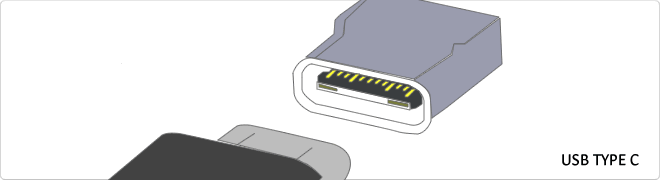
Reversible USB Type-C
USB-C reversible USB version called USB cables USB Type C Type C or USB reversible. The important thing is this type of USB is that it has top and bottom. So you may save the blows that are given involuntarily to connect the connector upside down. It is also characterized in that when connected will make an audible "click". The USB-C or reversible USB cables can reach 10 Gbps and support USB 3.0, 3.1Use is estimated up to 10,000 applications and has some measures 8.4mm x 2.6mm is also compatible with USB 3.1 and USB indicate creators
EPP
English stands for Enhanced Parallel Port serious. It is a communication method for bi-directional parallel between the PC and peripherals, offering speed ratios and much higher than traditional transfer methods for parallel transfer. EPP is not for printers, however ECP is mainly for printers and scanners. It is part of the IEEE 1284 standard.
ECP
The acronym would Enhanced Capability Port. It is a communication method for bi-directional parallel between the PC and peripherals, offering speed ratios and much higher than traditional transfer methods for parallel transfer. ECP would be mainly for printers and scanners It is part of the IEEE 1284 standard.
SPP
SPP correspond to Standard Parallel Port. It belongs to the IEEE 1284 protocol and serves to create a Bidirectional Parallel Peripheral Interface for PCs. It is a protocol that is compatible with all PC devices unlike ECP and EPP.
VDC
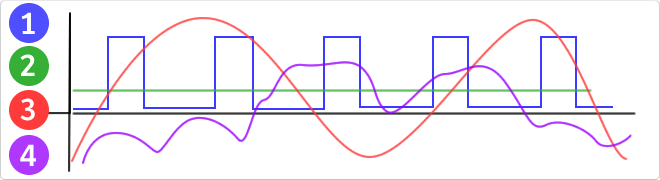
VDC would be the abbreviation for Volt Direct Current which translated would volts direct current. The idea of ??this type is unidirectional current to the load. Direct current is normally produced by batteries, thermocouples, solar cells and a dynamo electric machine type. The direct current can flow in conductors such as wires, but may also flow through semiconductors, insulators ... In the image: 1 - current per pulse 2 - Direct Current (DC) 3 - Alternating Current (AC) 4 - Variable Current
Bluetooth
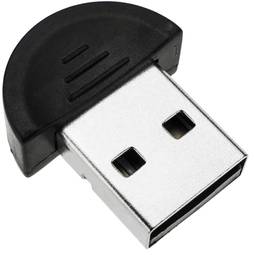
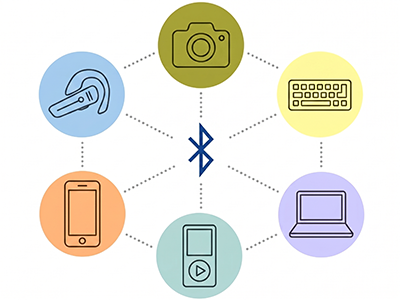
There are several ways to connect electronic devices to each other; cables, infrared, etc. Bluetooth technology is one of them and enabling wireless transmission of voice and/or data between devices by radio frequency.
It is a technology of radio waves at short range (2.4 GHz) whose objective is the communication between devices such as computers, smartphones, tablets, printers, headsets and other dispositives hand.
Bluetooth is called the communication protocol specifically designed for low-power devices. These devices can be classified according to their transmission power:
- Class 1: 100 mW, maximum range approximately 100 meters.
- Class 2: 2.5 mW, approximate maximum range between 5 and 10 meters.
- Class 3: 1 mW, maximum range approximately 1 meter.
We can also classify this technology by standard. All these versions have backward compatibility, ie, it allows the latest standard is compatible with all previous versions.
- Version 1.2: 1 Mbit/s
- Version 2.0 + EDR: 3 Mbit/s
- Version 3.0 + HS: 24 Mbit/s
- Version 4.0: 24 Mbit/s
![]()