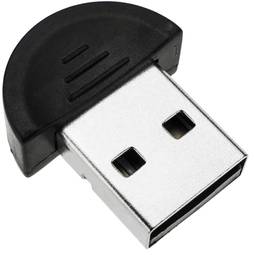
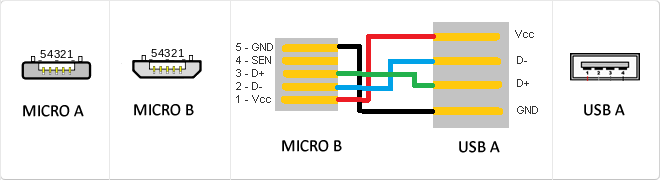
MicroUSB
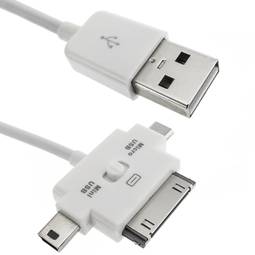
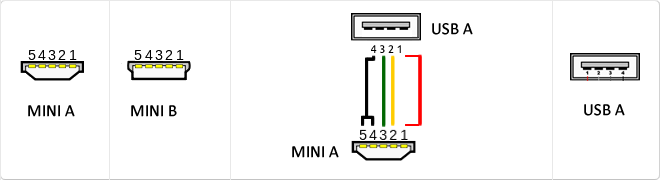
or horizontal. The micro USB with five pins, which pins identification (ID) Micro AB USB connectors special work. AB connectors with pin ID can allow the device to function as a connector A or B to standard USB technology. This gives the new smart phones and other devices the option to act as either a single storage device or as provi
USB
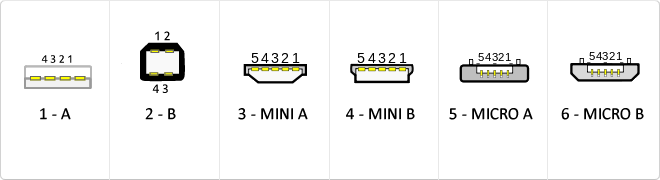
The USB (Universal Serial Bus) is a standard that defines the cables, connectors and used a bus to connect, communicate, computers, peripherals and electronic devices protocols Transmission Rates Low speed (USB 1.0). Transfer rate up to 1.5 Mbit/s (188 kB/s) used in keyboard, mouse ... transfer rate up to 12 Mbit/s (1.5 MB/s) High Speed ??(USB 2.0): Rate transferencia up to 480 Mbit/s (60 MB/s) SuperSpeed ??(USB 3.0) transfer rate up to 4.8 Gbit/s (600 MB/s) Connector Types 1 - USB type A (4 pin) 2. - USB type B (4 pin) 3 - Mini A (5-pin) 4 - Mini B (5-pin) 5 - Micro A (5-pin) 6 - Micro B (5-pin)
Reversible USB Type-C
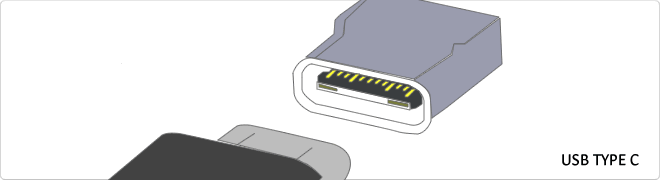
USB-C reversible USB version called USB cables USB Type C Type C or USB reversible. The important thing is this type of USB is that it has top and bottom. So you may save the blows that are given involuntarily to connect the connector upside down. It is also characterized in that when connected will make an audible "click". The USB-C or reversible USB cables can reach 10 Gbps and support USB 3.0, 3.1Use is estimated up to 10,000 applications and has some measures 8.4mm x 2.6mm is also compatible with USB 3.1 and USB indicate creators
RAID
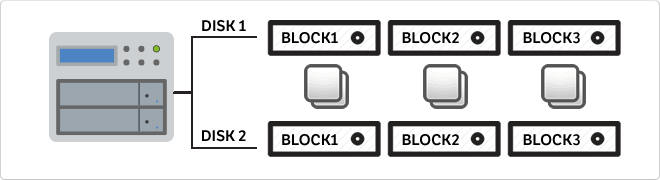
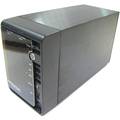
A RAID consider an array of independent drives, but where all data is stored simultaneously on each disk independently, this means that in the case of any failure, the others continue to operate normally. A RAID typically consists of 2 or more hard drives. The RAID also has an important feature, since the discs can be balanced and avoid bottlenecks that are oftencause when there are problems.
Mini USB
The mini USB connectors are smaller than their standard counterparts and have USB fifth pin. The fifth pin is known as the pin ID and is typically not used in mini USB connectors. It was designed to allow later improved USB technology. The mini USB connectors have a cycle life of at least 5000 connections and disconnections, which accommodates the mobile nature of the devices that are designed to interact. The standard USB connectors are generally used with devices that are stationary and not disconnected often.
Types of network cables (UTP, FTP, STP)
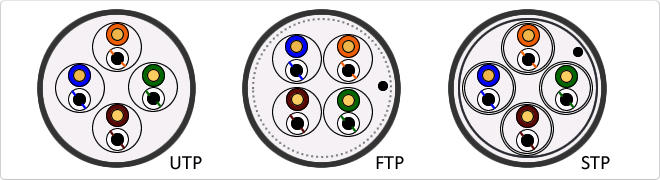
UTP cable is standard twisted pair is referred by its acronym UTP (Unshiedld Twiested Pair/Unshielded Twisted Pair). The major advantages of this cable are its low cost and ease of handling. Its main disadvantages are a higher error rate compared to other cable types and their limitations to work at high distances without regeneration. FTP is a type of cable caracteriza that each twisted pair is uniformly during creation. A comprehensive screening of all pairs is performed by a apantallante outer sheet. This technique allows to have similar characteristics to the shielded cable. STP is characterized by that each pair is covered with a metal mesh, in the same way that the coaxial cables, and the set of pairs is coated with a sheet apantallante. Referenced frequently with their acronym STP (Shield Twisted Pair/Shielded Twisted Pair)
Types SATA connectors
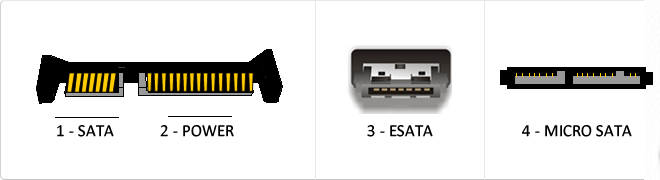
Serial ATA or SATA (acronym for Serial Advanced Technology Attachment) is a data transfer interface between the motherboard and some storage devices such as hard disk, regrabadores readers and CD/DVD/BR, SSDs or other high performance devices are still being developed. SATA I Frequency: 1500 MHz Bits: 1. Bits 8 Real Speed: 150 MB/s. SATA II. Frequency: 3000 MHz Bits: 1 bits 8 Real Speed: 300 MB/s. SATA III Frequency: 6000 MHz Bits: 1. Bits 8 Real Speed: 600 MB/s eSATA. SATA type connector for connection of external peripherals.
USB 3.0
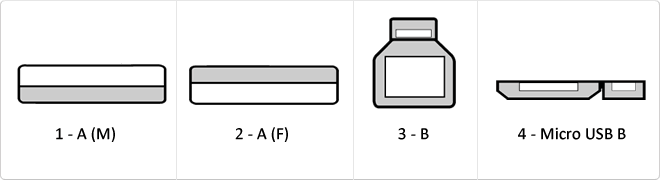
USB 3.0 is the second major revision of the standard Universal Serial Bus (USB) connectivity for computing. USB 3.0 has transmission speeds of up to 5 Gbit/s, which is 10 times faster than USB 2.0 (480 Mbit/s). Connector Types 1 - USB type A plug 2 - 3 USB type A female - USB type B 4 - Micro USB B
RJ45
When we talk about RJ45 ("Registered Jack" 45) we refer to a telecommunications network interface for wired connection of voice and data equipment.
This connector has 8 pins or connections and may have a specific category depending on the data transfer speed and bandwidth (category 5e, 6, etc.)
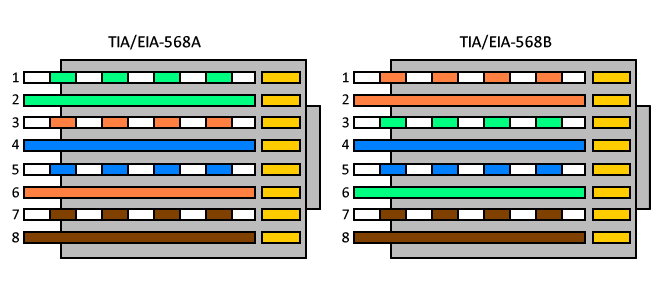
The common application is their use in Ethernet network cables under TIA/EIA-568-B standard that defines the arrangement of pins (pinout), but can also be used for other applications.
- Direct pin diagram:
EIA-568A
Pin No.1: WHITE-GREEN
Pin No.2: GREEN
Pin No.3: WHITE-ORANGE
Pin No.4: BLUE
Pin No.5: WHITE-BLUE
Pin No.6: ORANGE
Pin No.7: WHITE-BROWN
Pin No.8: BROWN
EIA-568B
Pin No.1: WHITE-ORANGE
Pin No.2: ORANGE
Pin No.3: WHITE-GREEN
Pin No.4: BLUE
Pin No.5: WHITE-BLUE
Pin No.6: GREEN
Pin No.7: WHITE-BROWN
Pin No.8: BROWN
- Schematic of crossed pins:
The crossover cable has one end with EIA-568A scheme and the other one with EIA-568B.
Electrical cables according to number of conductors
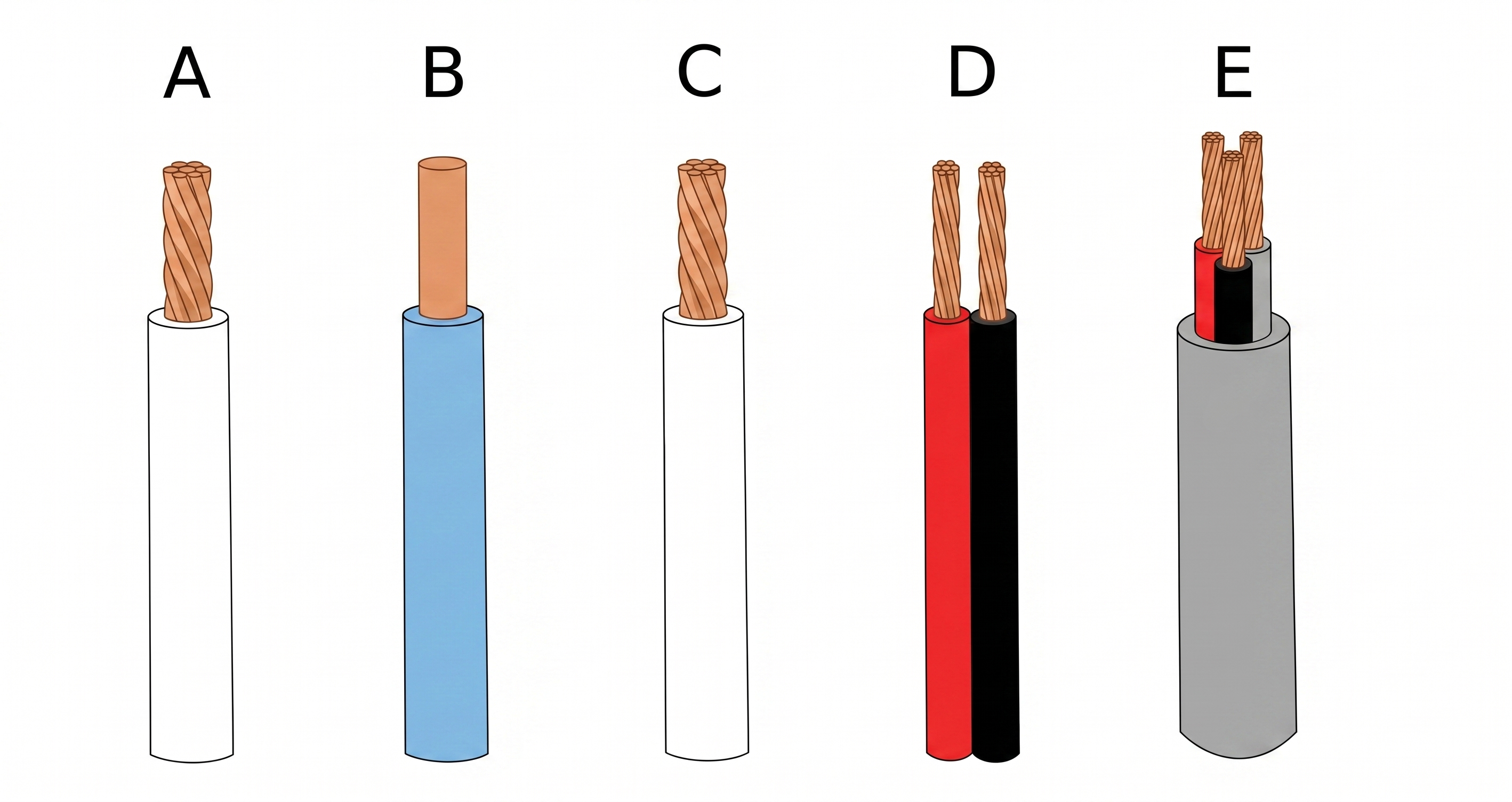
Within the different types of electrical cables we can find single or multifilament cables. The difference lies in the number of conductors that make up the cable. Single wire cables contain only a single conductive wire, whereas multi-wire cables contain more than one wire. Do not confuse multifile (A) or single wire (B) with monopolar (C), bipolar (D) or multipolar (E) cable. Monopolar cables have only oneSingle conductor, bipolar cables have two conductors, while multi-pole cables have more than two conductors. It may be said that any unipolar, bipolar or multipolar cable can be single-ended or multi-stranded. In the case of single wire cables we will talk about rigid cables, whereas the multifilament cables will be flexible.
In the following table you can see the difference between them.
Categories network cables
Network cable categories define the performance, frequency, and data transmission capacity in structured cabling infrastructures.
| Category | Max Speed | Frequency | Distance |
|---|
| Cat 6a | 10 Gbps | 500 MHz | 100 m |
Details and Advantages
Categorization ensures infrastructure can handle bandwidth demands and mitigates electromagnetic interference.
Note: Maximum distance is typically 100 meters per TIA/EIA standards.
DHCP
DHCP (Dynamic Host Configuration Protocol) is a client-server network management protocol used to dynamically assign IP addresses and network parameters to devices. It operates over UDP ports 67 and 68 to automate network configuration.
Imagine a hotel where every guest needs a room number. Instead of picking a number yourself and risking taking an occupied room, a receptionist gives you an available key as soon as you arrive. When you leave, that room number is automatically freed for the next guest.
| Specification | Detail |
|---|
| OSI Layer | Application Layer |
| Transport | UDP |
| Ports | 67 / 68 |
DORA Process
DHCP operation follows the DORA sequence: Discover, Offer, Request, and Acknowledge, ensuring a client receives a unique IP address for a specific lease time.
Advantages
- Centralized IP management.
- Prevents IP conflicts.
- Supports device mobility.
DHCP is vital for the scalability of modern IPv4 and IPv6 networks.
DC jack connector
Inside the different types of connectors for power supply we find one of the most common, the DC jack. Used in most connections in electronic devices such as routers, laptops, printers etc ... is the most used due to its easy assembly and connection. These connectors are mostly used in DC power supplies and installations.
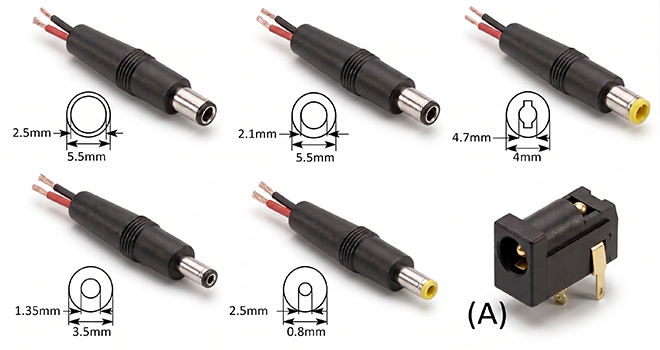
The connector is cylindricalAnd we find its version in male and female format (A). The male connector is composed of the outer and inner metal part, where in each of them the energy travels, normally the inner part is used for the positive pole and the outside for the negative, but may vary according to manufacturer.
This type of connector is found in many diameters, the most common are 3.5mm and 5.5mm. Although we can andThere are several measures in terms of length and outer or inner diameter.
Its installation is simple, we can find several types of connectors, pair to weld or to screw with terminal block, it will depend on the user to choose the most suitable in its installation.
When purchasing the male connector to perform a repair we must know its diameter, length of the connector and internal diameter. If we proceed with aTo new installation only we must make sure that the male and female connector are of the same characteristics.
![]()