Android - IOS
Android and iOS are the two leading mobile operating systems powering smartphones and tablets worldwide.
| Feature | Android | iOS |
|---|
| Developer | Google | Apple Inc. |
Technical Detail
Android is based on an open-source model (AOSP), while iOS is a closed-source proprietary system.
Key Advantages
Customization and hardware variety for Android; ecosystem stability and security for iOS.
Note: These platforms define the modern mobile development landscape.
Categories network cables
Network cable categories define the performance, frequency, and data transmission capacity in structured cabling infrastructures.
| Category | Max Speed | Frequency | Distance |
|---|
| Cat 6a | 10 Gbps | 500 MHz | 100 m |
Details and Advantages
Categorization ensures infrastructure can handle bandwidth demands and mitigates electromagnetic interference.
Note: Maximum distance is typically 100 meters per TIA/EIA standards.
CCTV
CCTV is a video surveillance technology used to monitor activities via cameras connected to a private set of monitors.
| Component | Description |
|---|
| Cameras | Analog or IP capture devices |
Technical Details
Modern systems feature AI analytics, night vision, and cloud storage capabilities.
Advantages
Deterrence of criminal activity and provision of forensic evidence for investigations.
Note: Compliance with local privacy laws is mandatory.
CVBS
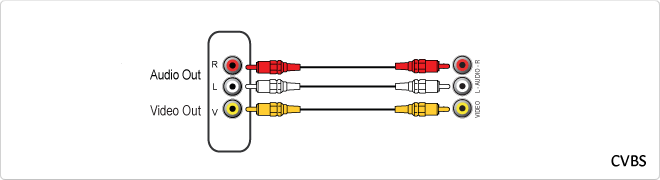
CVBS is an analog video signal format that carries standard definition video over a single channel by combining brightness, color, and sync information.
| Connector | RCA (Yellow), BNC |
|---|
Technical Detail
It integrates Luma (Y), Chroma (C), and Sync pulses into one single carrier frequency for transmission over coaxial cables.
Advantages
Universal compatibility and simple cabling requirements for basic video monitoring.
Note: Being phased out by digital standards like HDMI.
Movement detector
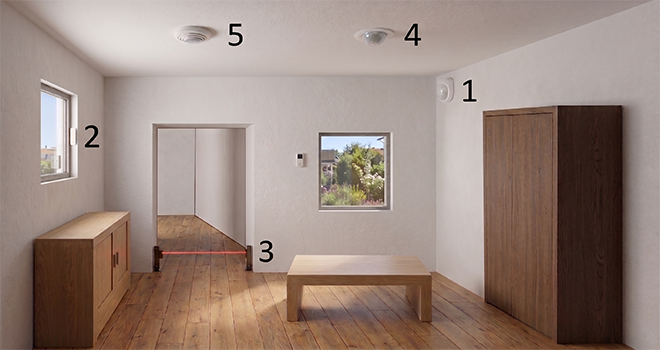
Within the detection systems we can find different types according to their operation, among them the most common:
- Infrared sensors
- Vibration sensors.
- Photoelectric sensors.
- Ultrasound sensors.
- Acoustic sensors
Each type of sensor uses different detection methods and each one is recommended according to the situation.
- Sensors by infraRrojos, are one of the most used types, thanks to its reliable operation and installation, since we can find this type of wired and wireless sensors.
The infrared sensor has a phototransistor capable of detecting the infrared electromagnetic radiation emitted by a body, this type of radiation is not visible by the human eye. A change of radiation in its perimeter will activate the relay and proceed to send ato alarm signal.
Within these, there are two models, passive infrared sensor, which only has a phototransistor and assets, which have an emitter and a receiver. - Vibration sensors are used mostly in security systems, such as window sensors. car alarms etc.
Its operation is based on an accelerometer, through a piezoelectric sensor. This type of sensorDue to its construction material it allows to detect changes and pressure when emitting an electric charge. - Photoelectric sensors, these are the sensors that use photoelectric rays, normally a transmitter and a receiver are used, they are commonly used in automatic door systems, elevator doors, production chains, etc.
- The ultrasonic sensors are those that emit an acoustic signalabout 30 kHz, a signal that is not appreciated by humans. This signal or wave propagates through space, walls, objects, doors, etc. once the signal has spread the sensor is activated and any change will trigger the sensor.
These types of sensors are also used in devices that require measuring distances and detecting objects. - Acoustic sensors, are those that can detect the signal emitted by anyobject and are able to detect the pressures that the acoustic waves emit, such as the noise of the crystals when breaking a window.
![]()
DHCP
DHCP (Dynamic Host Configuration Protocol) is a client-server network management protocol used to dynamically assign IP addresses and network parameters to devices. It operates over UDP ports 67 and 68 to automate network configuration.
Imagine a hotel where every guest needs a room number. Instead of picking a number yourself and risking taking an occupied room, a receptionist gives you an available key as soon as you arrive. When you leave, that room number is automatically freed for the next guest.
| Specification | Detail |
|---|
| OSI Layer | Application Layer |
| Transport | UDP |
| Ports | 67 / 68 |
DORA Process
DHCP operation follows the DORA sequence: Discover, Offer, Request, and Acknowledge, ensuring a client receives a unique IP address for a specific lease time.
Advantages
- Centralized IP management.
- Prevents IP conflicts.
- Supports device mobility.
DHCP is vital for the scalability of modern IPv4 and IPv6 networks.
BNC
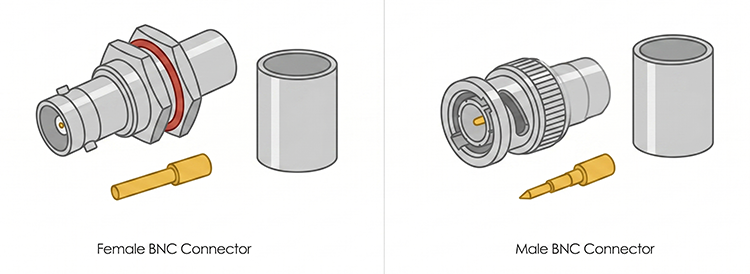
The BNC (Bayonet Neill-Concelman) is a miniature quick connect/disconnect RF connector used for coaxial cable.
Details
It features two bayonet lugs on the female connector; mating is achieved with only a quarter turn of the coupling nut.
Advantages
Reliable signal transmission and physical security against accidental disconnection.
Note: Essential for professional video and RF test equipment.
HDMI
The English acronym "HDMi" refers to "High Definition Multimedia Interface", that is, it corresponds to the initials of high definition multimedia interface.
The HDMi interface allows the transmission of video and audio between different devices, supporting the video resolutions 480i, 480p, 576i, 576p, 720p, 1080i, 1080p, 1440p, 1600p.
Different versions of HDMi
HDMi 1.0
- December 2002.
- Maximum transfer of 4.9 Gbit / s.
- Support up to 165 Mpixels / s in video mode (1080p 60Hz or UXGA) and 8 channels / 192 kHz / 24-bit in audio mode.
HDMi 1.2
- August 2005.
- Added support for One Bit Audio, used in Super Audio CD, up to 8 channels.
- HDMi Type A availability for PC connectors.
HDMi 1.3
- June 2006
- Bandwidth at 340 MHz.
- 10.2 Gbit / s data rate.
- Dolby TrueHD and DTS-HD,
HDMi 1.4
- Send high definition video and audio,
- 3D data and video.
- FullHD to XHD (eXtended High Definition) up to 4096 × 2160 pixels (24 frames per second) or 3840 × 2160 to (30 frames per second).
- Audio return channel that will require fewer cables to have a surround sound system connected to the television.
- Ethernet connection built into the cable itself with speeds of up to 100 Mbit / s.
HDMi 2.0
- September of 2013
- Bandwidth up to 18 Gbit / s
- 4K @ 50/60 (2160p) video
- Up to 32 audio channels for a multi-dimensional immersive experience
- Up to 1536kHz audio frequency for maximum sound fidelity
- Simultaneous delivery of 2 streaming video for multiple users on the same screen
- Audio streaming up to 4 users
- Support Theater Angle 21: 9 radio
- Dynamic synchronization of video and audio in streaming
- CEC command extensions to control multiple devices from a single point.
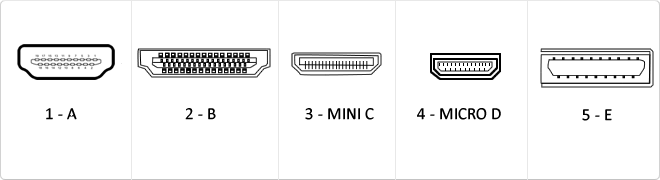
Types of HDMi
Type A (in image 1): It is the most standard connector used in almost all devices.
Type B (in image 2): It is a very little used connector.
Type C (in image 3): It is a connector widely used in tablets, smartphones and other devices.
Type D (in image 4): It is a connector used in smartphones.
Type E (in image 5): It is a connector used in vehicle connectivity.
![]()
USB
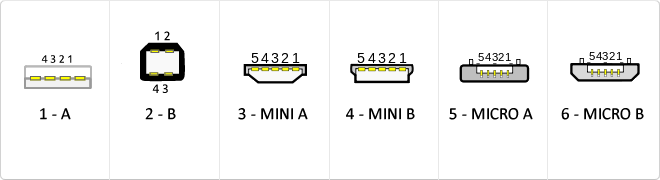
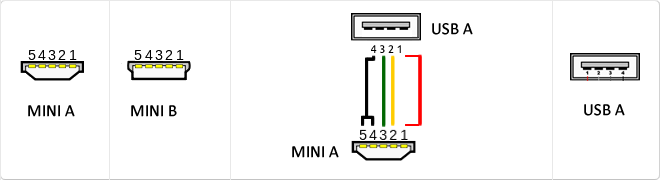
The USB (Universal Serial Bus) is a standard that defines the cables, connectors and used a bus to connect, communicate, computers, peripherals and electronic devices protocols Transmission Rates Low speed (USB 1.0). Transfer rate up to 1.5 Mbit/s (188 kB/s) used in keyboard, mouse ... transfer rate up to 12 Mbit/s (1.5 MB/s) High Speed ??(USB 2.0): Rate transferencia up to 480 Mbit/s (60 MB/s) SuperSpeed ??(USB 3.0) transfer rate up to 4.8 Gbit/s (600 MB/s) Connector Types 1 - USB type A (4 pin) 2. - USB type B (4 pin) 3 - Mini A (5-pin) 4 - Mini B (5-pin) 5 - Micro A (5-pin) 6 - Micro B (5-pin)
VGA
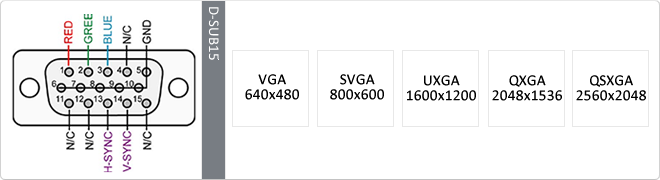
The term VGA (Video Graphics Array or Video Graphics Adapter) is a graphics display system for PCs developed by IBM. VGA has become one of the standards for the PC image. In text mode, VGA provides a resolution of 720 by 400 pixels. In graphics mode, the resolution is either 640 by 480 (with 16 colors) or 320 by 200 (with 256 colors). The color palette is 262,144.Unlike earlier graphic standards for PCs - MDA, CGA, EGA and VGA - uses analog signals rather than digital signals. Since its introduction in 1987, several other standards have been developed that offer greater resolution and more colors (SVGA, XGA ...), but VGA remains the denominator used. All personal computers manufactured today still have support VGA, and possibly some other more advanced connection.
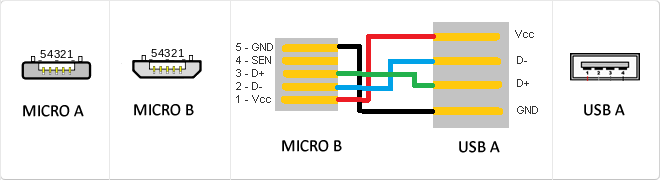
MicroUSB
or horizontal. The micro USB with five pins, which pins identification (ID) Micro AB USB connectors special work. AB connectors with pin ID can allow the device to function as a connector A or B to standard USB technology. This gives the new smart phones and other devices the option to act as either a single storage device or as provi
Mini USB
The mini USB connectors are smaller than their standard counterparts and have USB fifth pin. The fifth pin is known as the pin ID and is typically not used in mini USB connectors. It was designed to allow later improved USB technology. The mini USB connectors have a cycle life of at least 5000 connections and disconnections, which accommodates the mobile nature of the devices that are designed to interact. The standard USB connectors are generally used with devices that are stationary and not disconnected often.
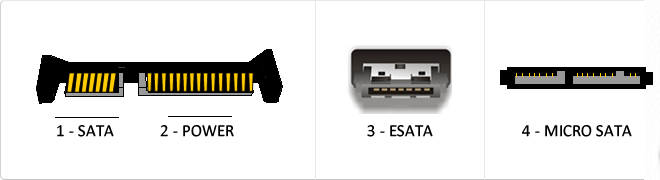
Types SATA connectors
Serial ATA or SATA (acronym for Serial Advanced Technology Attachment) is a data transfer interface between the motherboard and some storage devices such as hard disk, regrabadores readers and CD/DVD/BR, SSDs or other high performance devices are still being developed. SATA I Frequency: 1500 MHz Bits: 1. Bits 8 Real Speed: 150 MB/s. SATA II. Frequency: 3000 MHz Bits: 1 bits 8 Real Speed: 300 MB/s. SATA III Frequency: 6000 MHz Bits: 1. Bits 8 Real Speed: 600 MB/s eSATA. SATA type connector for connection of external peripherals.
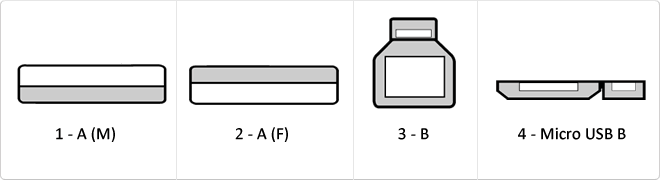
USB 3.0
USB 3.0 is the second major revision of the standard Universal Serial Bus (USB) connectivity for computing. USB 3.0 has transmission speeds of up to 5 Gbit/s, which is 10 times faster than USB 2.0 (480 Mbit/s). Connector Types 1 - USB type A plug 2 - 3 USB type A female - USB type B 4 - Micro USB B
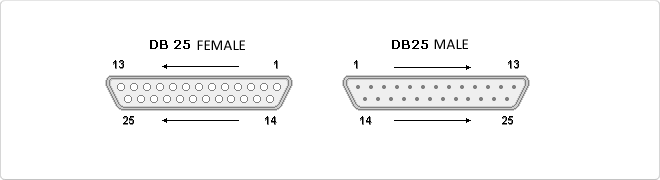
Parallel
Parallel cable is the cable for computers defined by the IEEE 1284 standard for connecting peripherals via the parallel port. It is often used for connecting printers compatible PC computers. It is considered an outdated connection and has been replaced by USB. - IEEE 1284 Type A: 25-pin DB-25 IEEE 1284 - IEEE 1284 Type B: 36 Drivers, Champ type Centerline Connector 0.085 insurance (Centronics). - IEEE 1284 Type C: 36 conductors, connector type mini Champ de Centerline 0.050 with secure clip (mini Centronics).
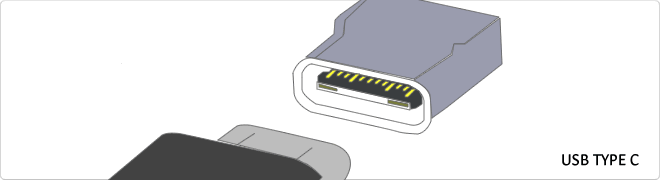
Reversible USB Type-C
USB-C reversible USB version called USB cables USB Type C Type C or USB reversible. The important thing is this type of USB is that it has top and bottom. So you may save the blows that are given involuntarily to connect the connector upside down. It is also characterized in that when connected will make an audible "click". The USB-C or reversible USB cables can reach 10 Gbps and support USB 3.0, 3.1Use is estimated up to 10,000 applications and has some measures 8.4mm x 2.6mm is also compatible with USB 3.1 and USB indicate creators
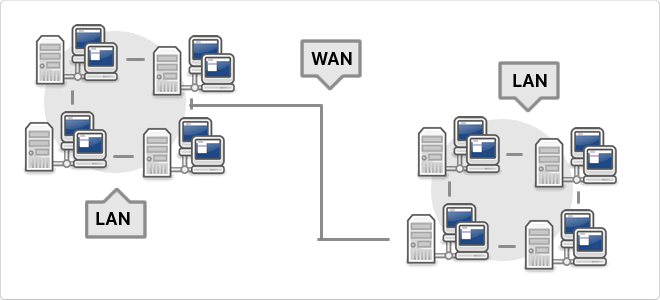
WAN
WAN, which is also known as wide area network is a network that consists of several private computers or organizations. Today with the speed that is in LANs is no longer necessary to use WAN
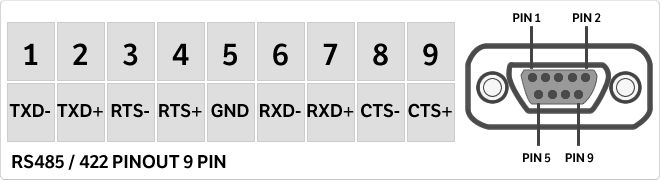
RS485
It is a special multi point communication for industrial machinery by its format adapted to long distance and heavy machinery. The connector is used to connect the DB9 serial port or popularly called. One characteristic is that it is able to greatly reduce the noise so that the distance is much greater.
DVR
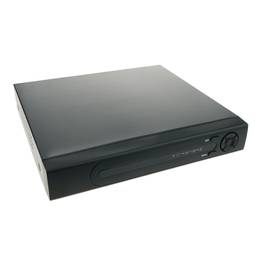
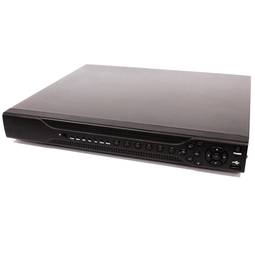
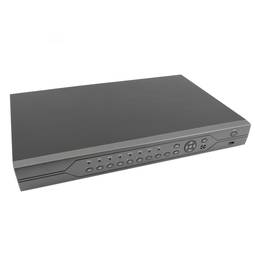
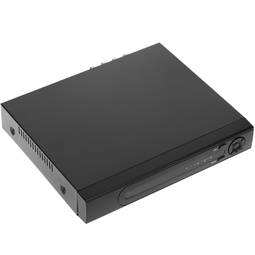
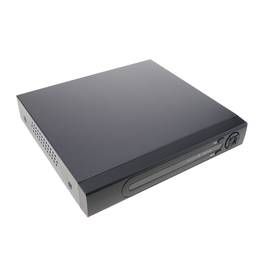
Correspond to DVR stands for digital video recorder, or DVR translated. The DVR in the case of the DVR Cablematic are systems of autonomous video surveillance that can store images from video surveillance chambers then it can be displayed on a PC or a TV because it has several outputs Normally inputs are BNC and outputs varies greatly depending on the model.
VDC
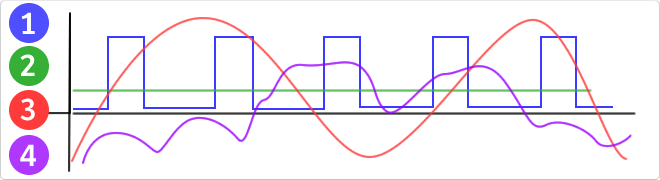
VDC would be the abbreviation for Volt Direct Current which translated would volts direct current. The idea of ??this type is unidirectional current to the load. Direct current is normally produced by batteries, thermocouples, solar cells and a dynamo electric machine type. The direct current can flow in conductors such as wires, but may also flow through semiconductors, insulators ... In the image: 1 - current per pulse 2 - Direct Current (DC) 3 - Alternating Current (AC) 4 - Variable Current
RJ45
When we talk about RJ45 ("Registered Jack" 45) we refer to a telecommunications network interface for wired connection of voice and data equipment.
This connector has 8 pins or connections and may have a specific category depending on the data transfer speed and bandwidth (category 5e, 6, etc.)
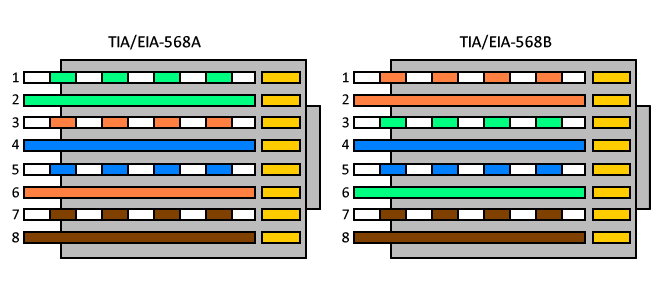
The common application is their use in Ethernet network cables under TIA/EIA-568-B standard that defines the arrangement of pins (pinout), but can also be used for other applications.
- Direct pin diagram:
EIA-568A
Pin No.1: WHITE-GREEN
Pin No.2: GREEN
Pin No.3: WHITE-ORANGE
Pin No.4: BLUE
Pin No.5: WHITE-BLUE
Pin No.6: ORANGE
Pin No.7: WHITE-BROWN
Pin No.8: BROWN
EIA-568B
Pin No.1: WHITE-ORANGE
Pin No.2: ORANGE
Pin No.3: WHITE-GREEN
Pin No.4: BLUE
Pin No.5: WHITE-BLUE
Pin No.6: GREEN
Pin No.7: WHITE-BROWN
Pin No.8: BROWN
- Schematic of crossed pins:
The crossover cable has one end with EIA-568A scheme and the other one with EIA-568B.
RCA
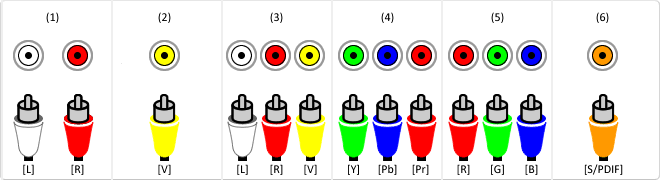
The RCA (Radio Corporation of America) connector is a connector used to send video signals or audio.
This is a circular two-contact connector; signal and ground, used with coaxial cables. Each signal uses a single cable and to differentiate color coded RCA connector on the set.
(1) Analog Audio:
Audio Left (White)
Audio Right (Red)
(2) Videoanalogical:
Video (Yellow)
(3) Composite Video:
Audio Left (White)
Audio Right (Red)
Video (Yellow)
(4) Video Component (YPbPr):
Y (Green)
Pb (Blue)
Pr (Red)
(5) Video components (RGB):
R (Red)
G (Green)
B (Blue)
(6) Digital Audio:
S/PDIF (Orange/Gold)






 Watch video
 2 years
 14 days
 100%
100%