Categories network cables
Network cable categories define the performance, frequency, and data transmission capacity in structured cabling infrastructures.
| Category | Max Speed | Frequency | Distance |
|---|
| Cat 6a | 10 Gbps | 500 MHz | 100 m |
Details and Advantages
Categorization ensures infrastructure can handle bandwidth demands and mitigates electromagnetic interference.
Note: Maximum distance is typically 100 meters per TIA/EIA standards.
HDMI
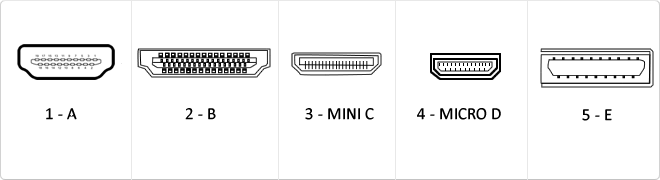
HDMI (High-Definition Multimedia Interface) is a digital interface standard designed for the simultaneous transmission of uncompressed audio and video streams from a compatible source to a digital display or receiver.
This interface employs Transition-Minimized Differential Signaling (TMDS) to maintain data integrity at high frequencies. Throughout its revisions, HDMI has evolved from a basic digital video solution into a complex data bus capable of carrying 4K signals at 60Hz, dynamic metadata, and bidirectional control protocols between devices.
| Version | Bandwidth | Audio/Video Support |
|---|
| 1.0 - 1.2 | 4.9 Gbit/s | 1080p @ 60Hz, 8 LPCM channels |
| 1.3 - 1.4 | 10.2 Gbit/s | 4K @ 30Hz, Deep Color, ARC, Ethernet |
| 2.0 | 18.0 Gbit/s | 4K @ 60Hz, 32 audio channels, HDR |
The mass adoption of the HDMI standard has transformed the interconnect architecture in multimedia data centers and high-performance workstations. Its ability to integrate Audio Return Channels (ARC/eARC) and Ethernet connectivity (HEC) has drastically simplified structural cabling, eliminating the need for multiple redundant analog and digital cables while ensuring signal integrity over significant distances through active equalization.
CEC Control and Multi-Streaming Integration
A critical innovation in version 2.0 is the ability to deliver simultaneous dual video streams on the same screen and up to four independent audio streams, optimizing bandwidth for multi-user applications.
Key Advantages
- Pure digital transmission avoiding D/A signal degradation.
- Full backward compatibility across all standard versions.
- Native support for high-resolution audio formats like Dolby TrueHD and DTS-HD.
- Support for 21:9 cinema aspect ratios and dynamic lip-sync.
Note: Final interface performance is dependent on the cable certification (Standard, High Speed, or Premium High Speed).
![]()
Minijack 3.5
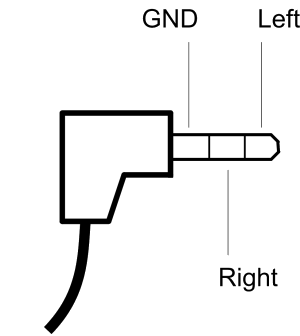
The minijack 3.5mm is a popular connector used primarily for headphones although its functionality is much more varied.
It consists of a maximum of three connecting parts being the largest so-called mass or negative polarity and two of smaller size and located farther end of the connector, called living or positive that correspond to each channel, such three-part plug can transmit signals in two different channels, also known as stereo signals. It also exists in a mono minijack but version composed of only two parts, a body and a living or positive.
USB
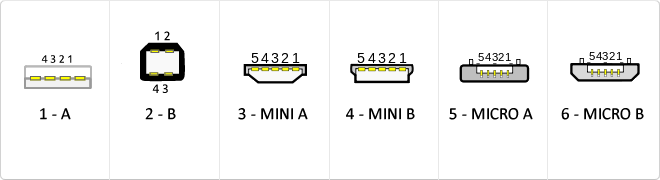
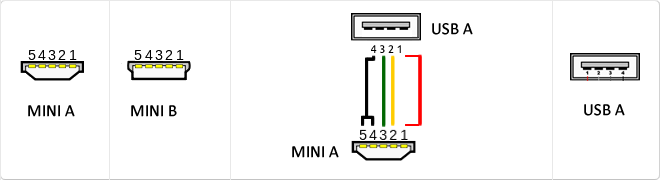
The USB (Universal Serial Bus) is a standard that defines the cables, connectors and used a bus to connect, communicate, computers, peripherals and electronic devices protocols Transmission Rates Low speed (USB 1.0). Transfer rate up to 1.5 Mbit/s (188 kB/s) used in keyboard, mouse ... transfer rate up to 12 Mbit/s (1.5 MB/s) High Speed ??(USB 2.0): Rate transferencia up to 480 Mbit/s (60 MB/s) SuperSpeed ??(USB 3.0) transfer rate up to 4.8 Gbit/s (600 MB/s) Connector Types 1 - USB type A (4 pin) 2. - USB type B (4 pin) 3 - Mini A (5-pin) 4 - Mini B (5-pin) 5 - Micro A (5-pin) 6 - Micro B (5-pin)
VGA
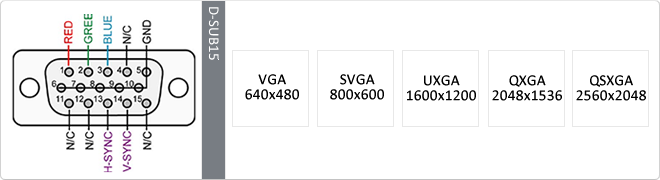
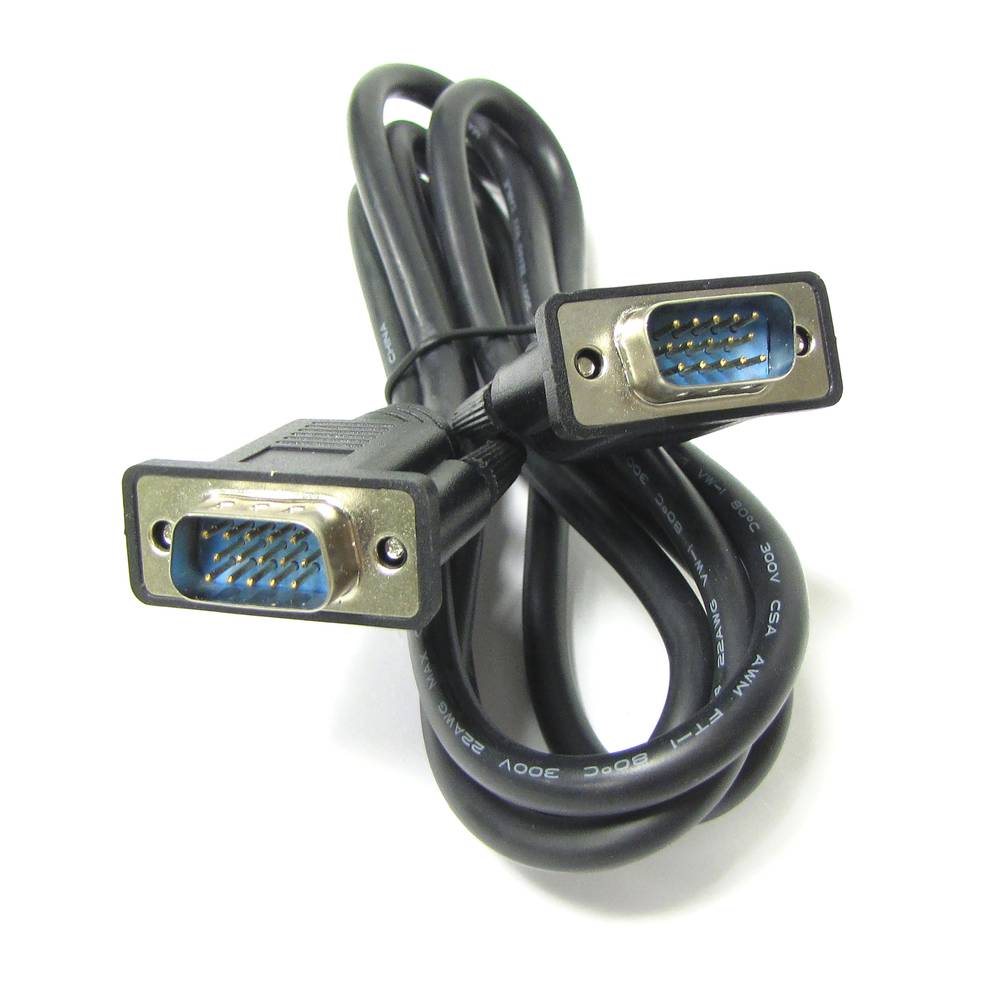
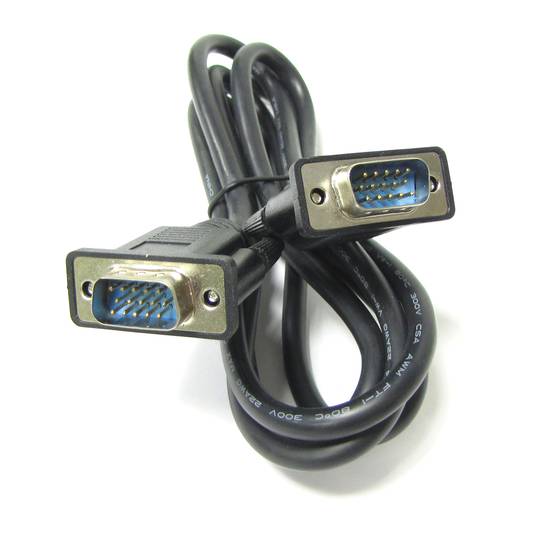
The term VGA (Video Graphics Array or Video Graphics Adapter) is a graphics display system for PCs developed by IBM. VGA has become one of the standards for the PC image. In text mode, VGA provides a resolution of 720 by 400 pixels. In graphics mode, the resolution is either 640 by 480 (with 16 colors) or 320 by 200 (with 256 colors). The color palette is 262,144.Unlike earlier graphic standards for PCs - MDA, CGA, EGA and VGA - uses analog signals rather than digital signals. Since its introduction in 1987, several other standards have been developed that offer greater resolution and more colors (SVGA, XGA ...), but VGA remains the denominator used. All personal computers manufactured today still have support VGA, and possibly some other more advanced connection.
MicroUSB
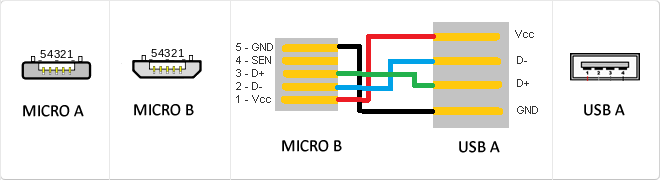
or horizontal. The micro USB with five pins, which pins identification (ID) Micro AB USB connectors special work. AB connectors with pin ID can allow the device to function as a connector A or B to standard USB technology. This gives the new smart phones and other devices the option to act as either a single storage device or as provi
Mini USB
The mini USB connectors are smaller than their standard counterparts and have USB fifth pin. The fifth pin is known as the pin ID and is typically not used in mini USB connectors. It was designed to allow later improved USB technology. The mini USB connectors have a cycle life of at least 5000 connections and disconnections, which accommodates the mobile nature of the devices that are designed to interact. The standard USB connectors are generally used with devices that are stationary and not disconnected often.
USB 3.0
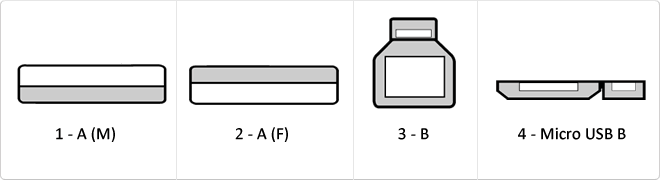
USB 3.0 is the second major revision of the standard Universal Serial Bus (USB) connectivity for computing. USB 3.0 has transmission speeds of up to 5 Gbit/s, which is 10 times faster than USB 2.0 (480 Mbit/s). Connector Types 1 - USB type A plug 2 - 3 USB type A female - USB type B 4 - Micro USB B
Reversible USB Type-C
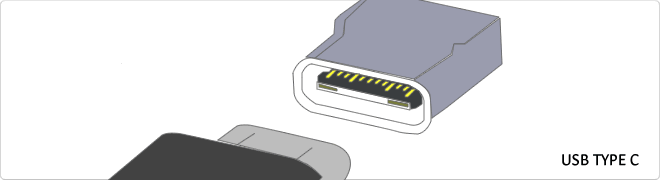
USB-C reversible USB version called USB cables USB Type C Type C or USB reversible. The important thing is this type of USB is that it has top and bottom. So you may save the blows that are given involuntarily to connect the connector upside down. It is also characterized in that when connected will make an audible "click". The USB-C or reversible USB cables can reach 10 Gbps and support USB 3.0, 3.1Use is estimated up to 10,000 applications and has some measures 8.4mm x 2.6mm is also compatible with USB 3.1 and USB indicate creators
WAN
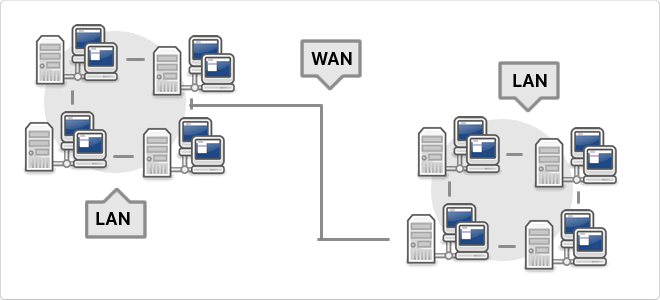
WAN, which is also known as wide area network is a network that consists of several private computers or organizations. Today with the speed that is in LANs is no longer necessary to use WAN
VDC
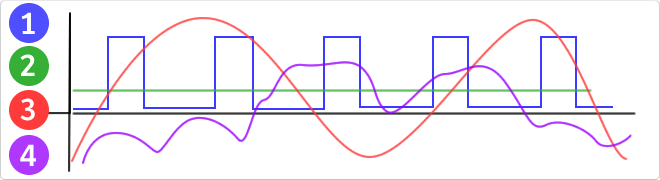
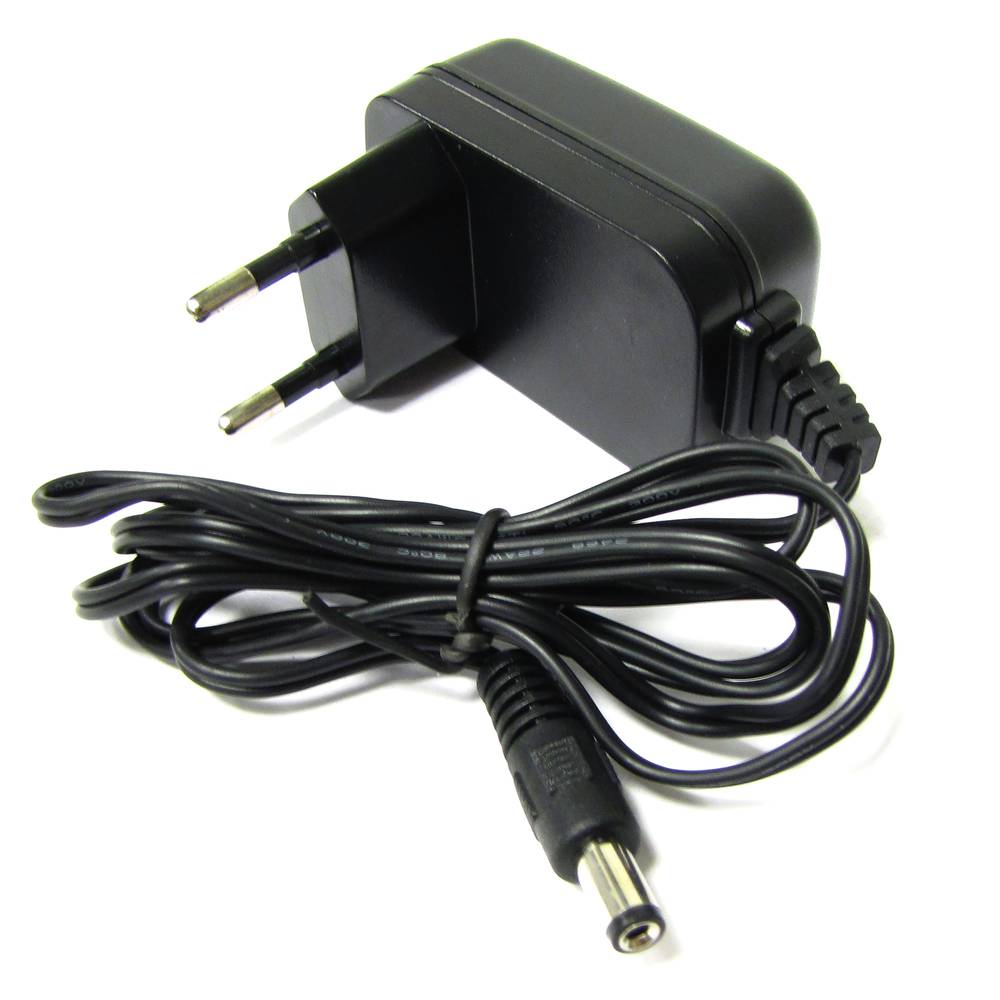
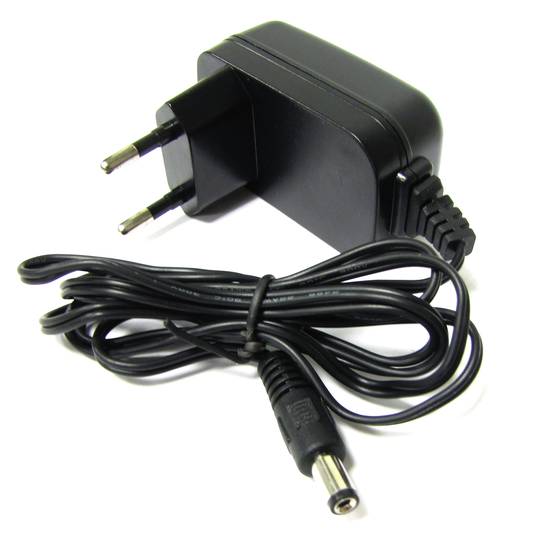
VDC would be the abbreviation for Volt Direct Current which translated would volts direct current. The idea of ??this type is unidirectional current to the load. Direct current is normally produced by batteries, thermocouples, solar cells and a dynamo electric machine type. The direct current can flow in conductors such as wires, but may also flow through semiconductors, insulators ... In the image: 1 - current per pulse 2 - Direct Current (DC) 3 - Alternating Current (AC) 4 - Variable Current
RJ45
When we talk about RJ45 ("Registered Jack" 45) we refer to a telecommunications network interface for wired connection of voice and data equipment.
This connector has 8 pins or connections and may have a specific category depending on the data transfer speed and bandwidth (category 5e, 6, etc.)
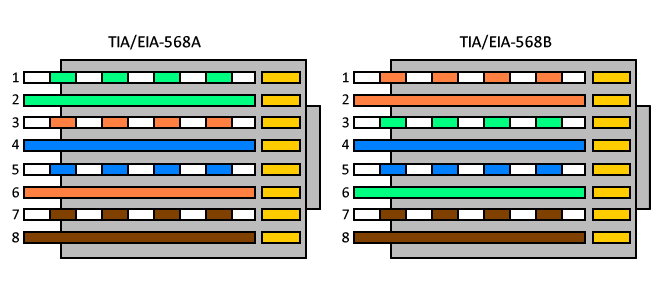
The common application is their use in Ethernet network cables under TIA/EIA-568-B standard that defines the arrangement of pins (pinout), but can also be used for other applications.
- Direct pin diagram:
EIA-568A
Pin No.1: WHITE-GREEN
Pin No.2: GREEN
Pin No.3: WHITE-ORANGE
Pin No.4: BLUE
Pin No.5: WHITE-BLUE
Pin No.6: ORANGE
Pin No.7: WHITE-BROWN
Pin No.8: BROWN
EIA-568B
Pin No.1: WHITE-ORANGE
Pin No.2: ORANGE
Pin No.3: WHITE-GREEN
Pin No.4: BLUE
Pin No.5: WHITE-BLUE
Pin No.6: GREEN
Pin No.7: WHITE-BROWN
Pin No.8: BROWN
- Schematic of crossed pins:
The crossover cable has one end with EIA-568A scheme and the other one with EIA-568B.
Jack connector
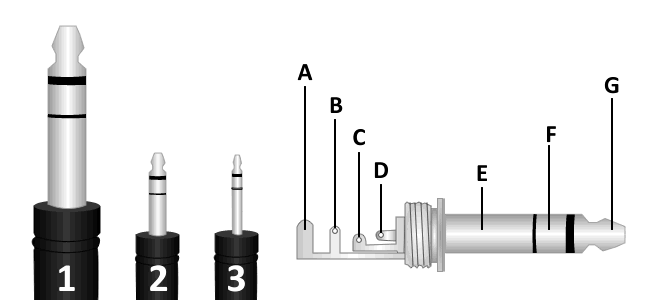
We can find 3 types of jack connector, monaural TS connector (tip-sleeve), TRS (tip-ring-sleeve) and TRRS stereo plug (tip-ring-ring-sleeve) which is used in most mobile devices, tablets, MP3 etc ...
We can difference these 3 types of connectors according to their diameter:
1. 6.35 mm jack connector or TS.
2. 3.5mm minijack connector or TRS, is the most common, usually used in headphone's output of portable devices.
3. 2.5mm jack connector or TRRS.
It consists of a maximum of three connecting parts being called the largest mass or negative polarity and two smaller size located more towards the end of the connector,
The called positive that correspond to each channel, such three-part plug can transmit signals in two separate channels, also known as stereo signals. There's a mono version, consisting of only two parts, a negative and a positive.
A. Protector
B. Stem
C. Ring
D. Tip
E. Kindred
F. Ring (Signal Right)
G. Tip (Signal Left)
Rack unit (U)
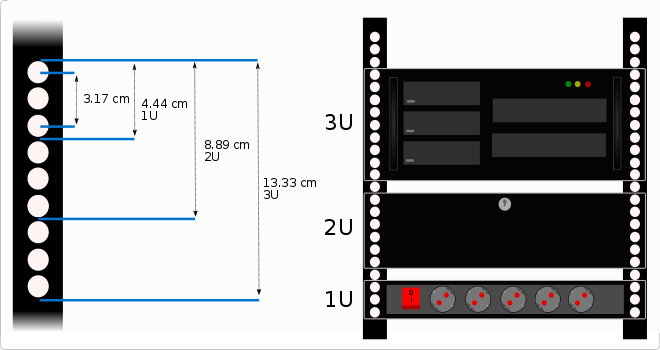
There are several cabinet heights according to the needs of the installation, this height can be measured in rack units (U).
Each rack unit or U is the distance between each horizontal separation to place the different accessories inside the rack. This distance is 1.75 inches that is equal to 4.4445 cm high.
For example, if we say that a rack is 8U we will understand that it has 8 units to install device orAccessories of 4.44 cm in height.
Normally these accessories, like trays, guides, strips, etc. Occupy a unit of U (1U), but we can find that other devices or accessories occupy more units, for example can be a rack box to install a PC, a UPS, etc. It can be said that there is also a half unit of U (0.5U), in this case, two units could be installed in a rack unit.
As far as I knowEndo the units of rack that occupy the devices that we are going to install we will know the height that we need for our rack.
The size of the rack unit (U) is based on the standard specification for racks defined in EIA-310.
![]()
DHCP
DHCP (Dynamic Host Configuration Protocol) is a client-server network management protocol used to dynamically assign IP addresses and network parameters to devices. It operates over UDP ports 67 and 68 to automate network configuration.
Imagine a hotel where every guest needs a room number. Instead of picking a number yourself and risking taking an occupied room, a receptionist gives you an available key as soon as you arrive. When you leave, that room number is automatically freed for the next guest.
| Specification | Detail |
|---|
| OSI Layer | Application Layer |
| Transport | UDP |
| Ports | 67 / 68 |
DORA Process
DHCP operation follows the DORA sequence: Discover, Offer, Request, and Acknowledge, ensuring a client receives a unique IP address for a specific lease time.
Advantages
- Centralized IP management.
- Prevents IP conflicts.
- Supports device mobility.
DHCP is vital for the scalability of modern IPv4 and IPv6 networks.





 Watch video
 2 years
 14 days
 100%
100%